How to switch between my personal space and the School Space?
Learn how to switch between your personal space and your school's institutional space.
If you already had a personal Intuitivo account with the same email your school used to give you school access, you will now have two spaces available in the same account and can switch between them quickly and easily.
How to switch between spaces
Log in to your Intuitivo account.
In the bottom left corner, click the option that appears in green below your name.
Select the space you want to use.
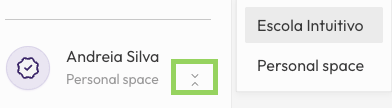
You can switch between spaces whenever you need to, without having to log out.
Note: This option is only available if the email of your personal account is the same one your school used to assign your school access. If not, the two accounts are independent.
Was this helpful?
Still need help? Share an idea